Hủy bỏ/Exit
Để liên lạc được bằng Audio và Video , máy phải có:
1-Web Cam (thí dụ như Logitech)
2-Sound card install
3-Speaker
Làm sao sử dụng Audio hay Video call
A)-Browser Setting
1a) Create directory C:\Temp nếu chưa có;
2a)-Nếu bạn dùng FireFox:
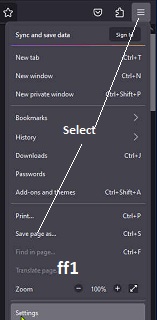
*Select Settings (xem hình ff1)
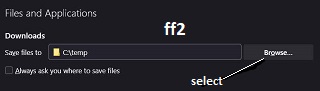
*Tìm xuống dưới tới hàng Downloads (xem hình ff2)
*Click Brows... và chọn directory C:\Temp
3a)-Nếu bạn dùng Microsoft Edge:
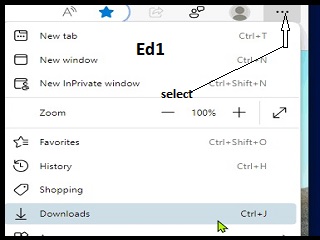
*Select Downloads (xem hình edg1)
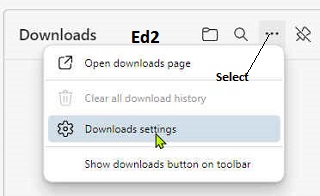
*Select Downloads Setting (xem hình edg2)
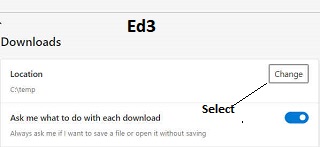
* Select Change to C:\Temp (xem hình edg3)
B-For Video, Tuần tự làm theo từ hình 1 tới 4
Picture 1 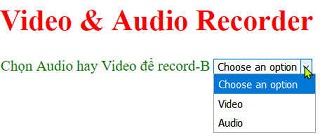
Select Video
Picture 2 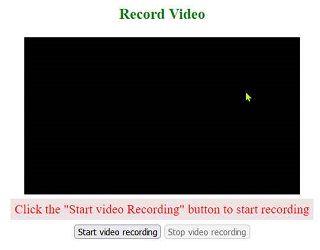
press Start Viudeo Recording
Picture 3 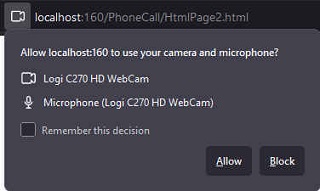
Select allow
Picture 4 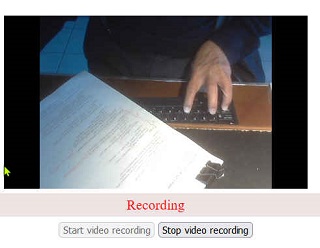
Stop recording after speaked to allow other side to answer
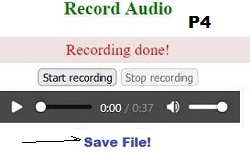
C- For Audio:(tương tự như Video) tuần tự làm theo từ hình 1 tới 4
Picture 1 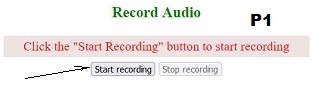
Picture 2 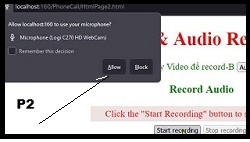
Picture 3 
Picture 4